
Federal contracting videos for small businesses
Short walkthroughs, under 30 seconds each, of how a small business finds and wins federal contracts with FedReady: finding notices that fit, reading a solicitation, answering a sources sought notice, writing a capability statement and checking your size standard. Each video has its own page with a summary, a transcript and a link to the full guide or free tool it comes from.
Prefer to read? Start with the guides, or look up a term in the glossary.
 How to Win Your First Federal Contract as a Small Business
Never won a federal contract? FedReady takes you from your UEI to a first proposal draft: contracts ranked by fit, a plain-English summary on each one, and every deadline in one place.
 Find Federal Contracts That Fit Your Small Business
SAM.gov has thousands of open contracts, and most aren't for you. FedReady ranks the open ones by how well they fit your business and tells you why: your NAICS code, a set-aside you qualify for, work in your state. Mark one "Not interested" and look-alikes rank lower.
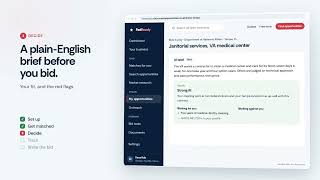
 Read a Federal Solicitation in Plain English (AI Bid Brief)
Federal solicitations are pages of fine print. FedReady's AI summary reads the notice and its attachments and tells you in plain English what the agency wants and the red flags, quoted from the notice. The AI fit check says how well your business fits. Then FedReady adds the requirements and submission steps to your bid checklist.
 Write a Government Proposal Faster: AI First Draft
FedReady's bid builder turns a solicitation into a proposal: AI writes the first draft from the notice and your business profile, with a cover letter, a section for each evaluation factor, your past performance, the price schedule and a compliance matrix. Rewrite any section, fill in what it left [in brackets], and download it for Word.
 How to Make a Capability Statement for Federal Contracts
When a contracting officer or prime asks for your capability statement, FedReady builds the one-pager from your business profile: UEI, CAGE, NAICS codes, competencies and past projects. Tailor a copy to each bid, and publish it as a web page you can link from your email signature.
 How to Respond to a Sources Sought Notice
A sources sought notice is an agency asking "who's out there?" before it decides how to buy, and answering is free. FedReady starts your response from the notice you saved: your company data, your size under its NAICS code and its questions in order, laid out the way contracting officers expect.
 Am I a Small Business? SBA Size Standards by NAICS Code
"Am I a small business?" depends on the NAICS code: SBA sets a size standard for each one. FedReady's free size check takes your average annual receipts and employees once and shows, code by code, where you count as small, so you know before you bid on a set-aside.
Find contracts for your business
Search every open federal contract for free, no account needed. A free account ranks them by how well they fit your business and reminds you before the deadlines of the ones you save.